
Leaderboards
Leaderboards rank fans by the points they earn through platform participation. FanFest supports both weekly and monthly leaderboard periods, and leaderboards can be scoped to the entire channel or to individual communities.
Viewing the Leaderboard
Every channel displays a leaderboard section on its main page. Fans can toggle between weekly and monthly views to see rankings. Clicking a fan's name opens their activity summary, showing a breakdown of how they earned their points.
The leaderboard displays the top fans with their avatars, usernames, and point totals. A "Full Leaderboard" button expands the view to show all ranked fans.

Managing Leaderboards
Channel Admins can access leaderboard management tools through the edit button on the leaderboard section. This opens a popover menu with four options:
- Edit Leaderboard -- Configure prizes for weekly and monthly periods
- Action Points -- Define platform-wide action point values (system admins only)
- Channel Actions -- Create channel-specific trackable actions
- Reward User -- Manually award points to a specific fan

Configuring Prizes
Leaderboard prizes incentivize fans to climb the rankings. Prizes are configured separately for weekly and monthly periods.
Setting Up a Prize
- From the leaderboard management popover, click Edit Leaderboard.
- Select either the Monthly or Weekly tab.
- Click on a leaderboard period to configure its prize.
- Enter a Prize Title describing the reward.
- Configure Prize Points -- these are bonus points awarded to fans who finish in specific positions:
- From Position / To Position: The leaderboard rank range (e.g., position 1 to 1 for the winner, or 2 to 5 for runners-up).
- Points: The bonus points awarded to fans in that range.
- Click Add Prize Row to create additional tiers (e.g., different rewards for 1st place, 2nd-5th place, and 6th-10th place).
- Click Save to store the prize configuration.

Prize Position Ranges
Position ranges must not overlap. For example, you can have 1-1 (first place), 2-5 (runners up), and 6-10 (honorable mentions), but not 1-5 and 3-10. The system validates this automatically.
Issuing Prize Points
After a leaderboard period ends, an admin can issue the configured prize points to winners:
- Open the prize configuration for the completed period.
- Verify the prize settings are correct.
- Click Issue Points to distribute bonus points to all qualifying fans.
The Issue Points button is only available when the current prize configuration has been saved (no unsaved changes).
Channel Actions
Channel Actions represent specific interactions you want to track and reward. They connect to platform-wide App Actions that define the base reward rules.
Creating a Channel Action
- From the leaderboard management popover, click Channel Actions.
- Click Add New Channel Action.
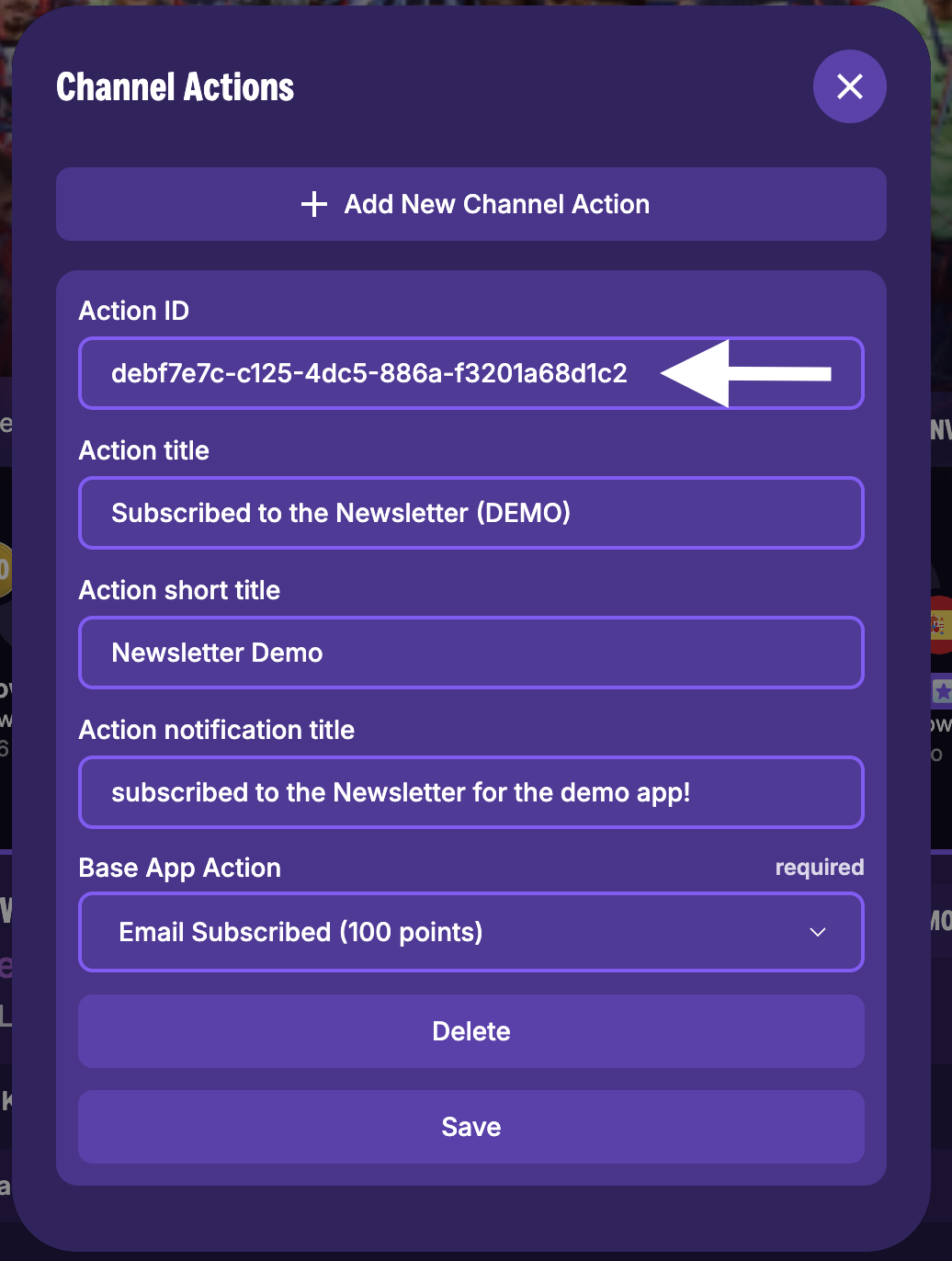
- Fill in the action details:
- Action Title: A descriptive name (e.g., "Newsletter Subscription", "Browsed Tickets").
- Action Short Title: A concise name shown in activity feeds (e.g., "Subscribed", "Browsed Tickets").
- Action Notification Title: The notification text fans see when they earn points (e.g., "+100 points! Subscribed to Newsletter!").
- Base App Action: Select the platform-wide action that best matches. This determines the base point reward and matching criteria.
- Click Save to create the action.

- Copy the Action ID from the newly created action. This ID is used to connect external event tracking to this action. See Tracking Events for integration details.
Editing and Deleting Channel Actions
Each channel action card displays its current configuration. You can:
- Edit any field (title, short title, notification title, base app action) and click Save.
- Click Delete to remove the action. A confirmation dialog prevents accidental deletion.
Action Points (System Admins)
System administrators can manage the platform-wide App Actions that define what point-earning behaviors exist and how many points each is worth. This option is only visible to system admins.
Managing App Actions
- From the leaderboard management popover, click Action Points.
- View the list of existing app actions with their names, titles, and point values.
- To create a new app action, click Add New Action and fill in:
- Action Name: A unique identifier using uppercase letters, numbers, and underscores (e.g.,
NEWSLETTER_SIGNUP). - Action Title: A human-readable name.
- Action Short Title: A concise label for activity feeds.
- Action Notification Title: The notification text displayed to fans.
- Number of Points: The base points awarded (1 to 1,000,000).
- Action Name: A unique identifier using uppercase letters, numbers, and underscores (e.g.,
- Click Save to create or update the action.
Logical Actions
Some actions are marked as logical -- these are system-defined actions that cannot be deleted. They represent core platform behaviors like show attendance, contest participation, and chat activity.
Rewarding Users Manually
Admins can manually award points to individual fans:
- From the leaderboard management popover, click Reward User.
- Search for a user by username or email.
- Select the user from the results.
- Choose the action to reward and the points to issue.
This is useful for special recognitions, contest prizes awarded outside the standard leaderboard cycle, or correcting point balances.
Community-Scoped Leaderboards
When a channel has multiple communities, leaderboards can be filtered by community. The leaderboard section automatically respects the currently selected community context, showing only points earned within that community's scope.
Prize configurations are also community-aware -- you can set different prizes for each community's leaderboard.
Points Multiplier
Fans with a premium membership (Superfan) earn a points multiplier on all actions. The leaderboard section displays a prompt encouraging non-premium fans to upgrade for the multiplier benefit. See Memberships for details on configuring membership tiers.
Related
- Points System -- How points are earned, stored, and tracked
- Tracking Events -- Connecting external website events to channel actions
- Memberships -- Premium memberships with points multipliers